Route direction preference: routes in one direction
By Nathan ColeUpdated
Route direction preference is a Starter feature. The free tier can use it within the free paid-feature optimizations.
By default, the optimizer arranges the stops of a route for the lowest total cost. A route can therefore leave an area and return to it later. Route direction preference gives routes a preferred direction when their vehicles have suitable depots. The optimizer prefers orders from the start depot toward the end depot, or the farthest orders first. For example, the 59-order plan described below has a southeastward direction with Start depot to end depot. The setting requires no input on the orders.
This page covers the options of the setting, the vehicles it applies to, how the optimizer applies the direction, and the rules that take precedence over it.
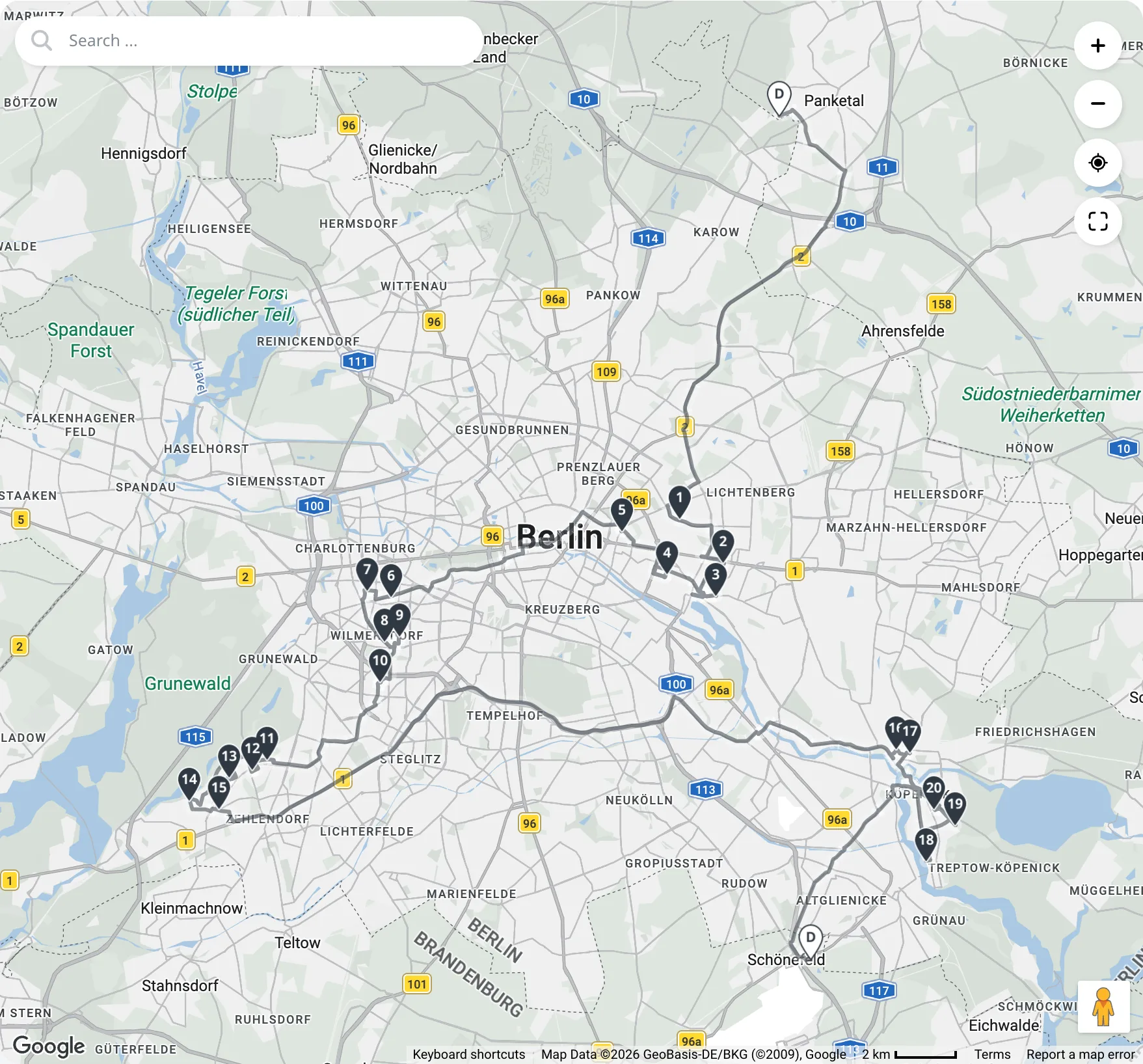
This tutorial plan has one vehicle and 20 orders in four areas of Berlin. The plan sets Route direction preference to Start depot to end depot:
Options
Route direction preference is set in Settings on the Optimize page. One value applies to every route of the plan and to every optimization of the plan:
- Off: the optimizer applies no direction. This is the default. For example, the 59-order plan described below has a 348.5 km route with Off.
- Start depot to end depot: the optimizer prefers orders from the start depot toward the end depot. For example, it serves northern orders before southern orders on a southward route when other rules permit.
- Farthest first: the optimizer prefers the farthest orders first and the remaining orders on the return toward the end depot. For example, the 59-order return route described below serves southern orders first.
Start depot to end depot
When the orders of a route lie along the straight line between its depots, the optimizer uses each order's position along that line. For example, a route has four orders around each point 5 km, 15 km, and 25 km south of the Start Depot. Its Finish Depot is 30 km south of the Start Depot. The optimizer prefers the northern orders first. Other rules can require a different order of stops.
The middle of the orders is their average location. The optimizer uses the straight line only when the route meets all three conditions:
- The distance between the depots is at least the distance from the middle of the orders to the farthest order. For example, a route has depots 2 km apart and four orders around each point 5 km, 15 km, and 25 km south of the start depot. The optimizer groups neighboring orders into sections.
- The point on the line nearest the middle of the orders lies in the middle half between the depots. For example, a route starts 20 km north of its end depot. It has four orders around each point 5 km, 15 km, and 25 km south of the end depot. The optimizer groups neighboring orders into sections.
- The orders spread at most twice as far across the line as along it. For example, a route has depots 60 km apart from west to east. It has four orders around each of three points on a 50 km road. The road runs from north to south. It crosses the line halfway between the depots. The points lie 25 km north of the line, on the line, and 25 km south of it. Each point is 30 km east of the start depot. The optimizer groups neighboring orders into sections.
When any condition fails, the optimizer forms sections from neighboring orders on routes with at least four orders. A route that returns to its start depot never meets these conditions. For example, the 59-order return route described below has three sections with Start depot to end depot.
The optimizer compares paths from the start depot through the middle of each section to the end depot. Among paths within 2% of the shortest, it prefers the nearer section first at each step. It measures these paths in straight-line distances. For example, on the 59-order return route, the section nearest the depot is first.
The setting has no compass directions. When the orders meet all three conditions, the vehicle's Start Depot and Finish Depot fields on the Fleet page determine its direction along the line. For example, swapping the depots of the 30 km route above reverses the preferred direction from southward to northward.
Farthest first
The optimizer computes the driving time from every order to the Finish Depot of the vehicle. It prefers orders with the longest driving time first and orders near the Finish Depot last. For example, in the 59-order return route described below, the vehicle starts at the northern depot and serves the southern orders first.
Tutorial route
The tutorial's Van works from 08:00 to 20:00. Its Start Depot is North depot in Panketal, north of Berlin. Its Finish Depot is South depot in Schönefeld, south of Berlin. The depots are 28 km apart in a straight line.
Every order has a Service duration of 10 minutes. Each area has five orders:
| Area | Order ids | Locations |
|---|---|---|
| East | East 1 to East 5 | Fennpfuhl, Friedrichshain, Lichtenberg, and Rummelsburg |
| West | West 1 to West 5 | Charlottenburg and Wilmersdorf |
| South-west | South-west 1 to South-west 5 | Zehlendorf and Schlachtensee |
| South-east | South-east 1 to South-east 5 | Köpenick |
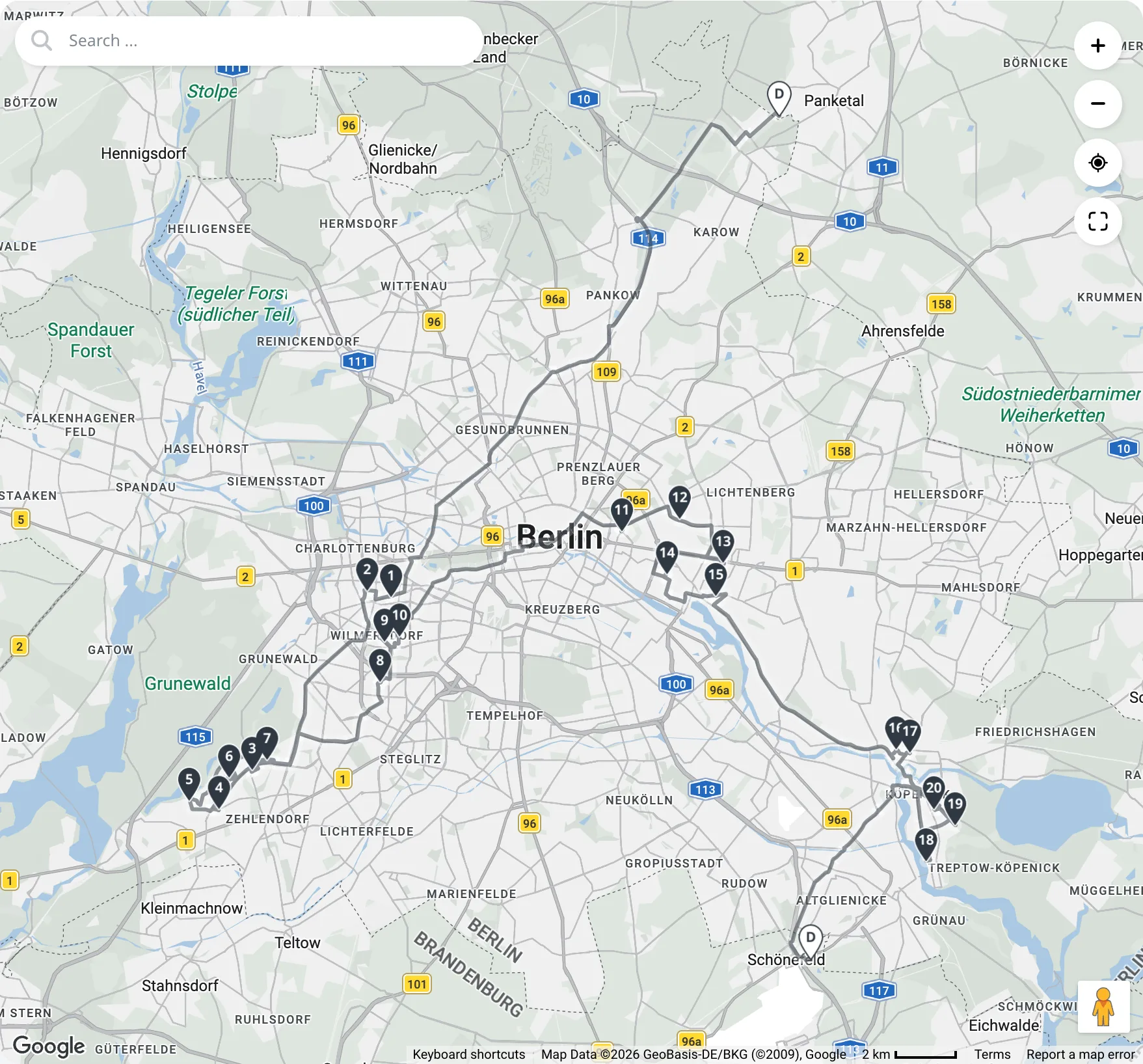
Van serves all 20 orders with both Off and Start depot to end depot. The map pins show the stop numbers in visiting order. Van visits the areas in the following order:
| Area visit | Off | Start depot to end depot |
|---|---|---|
| 1 | West (stops 1 to 2) | East (stops 1 to 5) |
| 2 | South-west (stops 3 to 7) | West (stops 6 to 10) |
| 3 | West (stops 8 to 10) | South-west (stops 11 to 15) |
| 4 | East (stops 11 to 15) | South-east (stops 16 to 20) |
| 5 | South-east (stops 16 to 20) | No further area |
Optimize the tutorial plan with its initial Start depot to end depot setting. The route is 106.4 km long. This is 2.2 km (2.1%) longer than with Off. All route lengths in this example measure road distance.
With Start depot to end depot, Van enters each area once. Its largest return toward North depot measures 2.3 km along the line between the depots.
To compare with Off, change Route direction preference to Off in Settings on the Optimize page. Save the setting and optimize again. The route is 104.2 km long.
With Off, Van enters the West area twice. After stop 7 in South-west, Van returns north to West at stops 8 to 10. It then serves East at stops 11 to 15. Its largest return toward North depot measures 9.2 km along the line between the depots.
Vehicles without a direction
The preference applies to a vehicle only when the depots of the vehicle define a direction:
- Start depot to end depot applies to a vehicle whose Start Depot and Finish Depot both have geocoded addresses. The two may be the same depot or have the same location. It does not apply to a vehicle with an empty Start Depot or an empty Finish Depot.
- Farthest first applies to a vehicle with a Finish Depot, including a vehicle that returns to its start depot. It does not apply to a vehicle with an empty Finish Depot.
- Neither option applies while a depot the option uses has an ungeocoded address. Start depot to end depot uses both depots, and Farthest first uses the Finish Depot.
The optimizer builds the route of a vehicle without a direction as with Off. For example, Start depot to end depot does not affect North van when its Finish Depot is empty. When no vehicle of the plan has a direction, the setting has no effect.
Settings lists the vehicles without a direction and the cause in these notes:
| Note | Option | Cause |
|---|---|---|
| "No direction for vehicles without a start depot or an end depot: Van 1." | Start depot to end depot | Start Depot or Finish Depot is empty |
| "No direction for vehicles without an end depot: Van 1." | Farthest first | Finish Depot is empty |
| "No direction for vehicles whose depot has an ungeocoded address: Van 1." | Both options | A depot the option uses has an ungeocoded address |
Both options give a direction to a vehicle that returns to its start depot. For example, North van has a direction with either option when its depot has a geocoded address. The depot fields are described in Multiple depots, open routes, and reloads.
How the optimizer applies the direction
The optimizer divides the orders of each route with a direction into up to three sections. The route serves all orders of the first section before the next, unless another rule requires a different order. Within a section, the optimizer arranges the stops for the lowest cost. For example, the 59-order plan described below has three sections and no return to an earlier section with Start depot to end depot.
The number of sections depends on the number of orders on the route:
- Six or more orders: up to three sections.
- Four or five orders: up to two sections.
- Fewer than four orders: no sections. The preference does not change such a route.
When the optimizer uses the depot line, orders with the same position along it remain in one section. For example, six orders at only two positions along the depot line form two sections. With Farthest first, orders with the same driving time to the end depot remain in one section. If all orders have the same value for the chosen option, the preference does not change their order.
When the optimizer groups neighboring orders, orders at the same location remain in one section. For example, six orders at only two locations form two sections. If all orders have the same location, the preference does not change their order.
The optimizer determines the sections automatically and separately for each route, using that route's orders and its vehicle's depots. For example, two routes of six orders each can have three sections each in different locations. No setting defines the sections. Routing24 does not display them.
The optimizer never leaves an order unassigned to keep the direction. For example, a transfer from a southern pickup to a northern delivery takes precedence over a southward direction. The optimizer can still leave an order unassigned if it cannot satisfy other rules. These interactions are described in Interactions with other rules.
Effect on the length of the routes
The preference can increase route length even when the orders are located between the depots. For example, a plan has one vehicle, 59 orders, a start depot north of the orders, and an end depot southeast of them. Without the preference, the route is 348.5 km long. The vehicle returns as far as 39 km north of an earlier stop before continuing to the end depot. With Start depot to end depot, the route is 353.6 km long, which is 1.5% more. The vehicle returns no more than 9 km north of an earlier stop. These northward distances measure changes in latitude, not road distance.
The added distance depends on the arrangement of the orders. Test plans with Start depot to end depot have the following results:
- An almost complete circle has depots about 10 km apart at the ends of 115 km of arc. The optimizer groups neighboring orders into sections. The route is 120.3 km long with either Off or Start depot to end depot.
- A spiral also uses sections of neighboring orders. Its route is 262.8 km long with Start depot to end depot, compared with 236.6 km with Off. The increase is 11%.
- A path that runs back and forth three times between the depots' ends uses sections along the straight line between the depots. Its route is 183.9 km long with Start depot to end depot, compared with 154.2 km with Off. The increase is 19%.
Farthest first can increase the length of a route that returns to its start depot. Without the preference, the vehicle can serve orders on the outward and return journeys. With Farthest first, it prefers the farthest orders before those nearer the depot. For example, the plan above with the vehicle returning to the northern depot is 428.6 km long with Farthest first and 389.6 km long without it. The increase is 10%.
With Start depot to end depot, the same return route is about 418 km long, which is about 7% more than with Off. The route serves each of its three sections once.
Where the result is shown
The route cards and the map on the Optimize page show the stops in the resulting order. For example, the 59-order return route shows southern orders first with Farthest first. Routing24 shows no separate figure for the preference or the added distance.
The assistant can report the total number of returns to an earlier section after an optimization. For example, the 59-order plan has 0 with Start depot to end depot. Routing24 recalculates the count after manual route edits using the direction applied in the last optimization. Changing the preference alone does not update the count. It is absent when that optimization had no direction preference or no vehicle with a direction.
Interactions with other rules
Every hard rule of the plan takes precedence over the preference. The preference interacts with the following rules and edits:
- Time windows. The optimizer serves an order inside its time window. For example, an order near the end depot may require service first to meet its time window of 08:00 to 09:00 on a route starting at 08:00. The route then returns to orders near the start depot.
- Order sequences. The members of an order sequence follow rank order, even against the direction. For example, rank 1 near the end depot precedes rank 2 near the start depot.
- Transfers. The pickup of a transfer precedes its delivery. For example, a southern pickup precedes its northern delivery even on a route with a southward direction.
- Reloads. On a route with reloads, the direction applies to the whole route and does not start again after a reload. The drive to the depot and back is not counted as a return to an earlier section. For example, a vehicle with capacity for 10 units serves 30 one-unit orders over three trips without restarting the direction at each reload.
- Manual edits. The preference applies to an optimization. A manual edit can move a stop against the direction. For example, moving a southern stop before a northern stop can reverse their preferred order. Routing24 reports no problem for a direction change.
In spreadsheets
The Settings sheet of every exported workbook contains the row
Route direction preference, under a group title of the same name. The
value is Off, Start depot to end depot, or Farthest first, in the
language of the workbook. An empty value means Off. Routing24 also
accepts labels in other supported languages and the values off, depots,
and farthest_first, without regard to capitalization. For example,
depots imports as Start depot to end depot. Routing24 reports an
unrecognized value and uses Off.
Routing24 applies the setting when importing the workbook as a new plan.
An import into an existing plan does not change the setting of that plan.
For example, importing Farthest first into a plan with Off leaves
Off unchanged. The other rows of the sheet are described in
Route balancing.
Next step
The depots of a vehicle determine which direction options apply. Multiple depots, open routes, and reloads describes the Start Depot and Finish Depot fields and routes without a start depot or an end depot.
FAQ
How do I make a route start in the north and progress south?
Set the Start Depot north of the orders and the Finish Depot south of them. Choose Start depot to end depot under Route direction preference in Settings on the Optimize page. When the orders lie along the line between the depots, the optimizer prefers northern orders first. Other rules take precedence. The setting has no compass directions.
Does the route direction preference leave orders unassigned?
No. The optimizer never leaves an order unassigned to keep the direction. A time window, an order sequence, or a transfer can require a different order of stops. For example, a transfer from a southern pickup to a northern delivery takes precedence over a southward direction.
Which vehicles does the preference apply to?
Start depot to end depot requires geocoded Start Depot and Finish Depot addresses, even at the same depot or location. Farthest first requires a Finish Depot with a geocoded address, including for a vehicle that returns to its start depot. Settings lists the vehicles without a direction and the reason for each. The optimizer builds their routes as with Off.
Does the preference make the routes longer?
The added distance depends on the territory. With Start depot to end depot, the 59-order example is 1.5% longer between two depots and about 7% longer returning to its start depot. Test routes increase by 11% for a spiral and 19% for a path running back and forth. An almost complete circle has no increase.