Capacity, deliveries, and pickups
By Nathan ColeUpdated
Every vehicle has a Capacity. Every order has a load, set in its Delivery and Pickup fields. The optimizer never builds a route whose on-board load exceeds the vehicle's Capacity at any stop. This page covers the load unit, deliveries versus pickups, how the optimizer fills a vehicle, named load units, and the LOAD numbers on an optimized route.
This tutorial plan contains eleven orders and two vans. Ten orders are deliveries totaling 29 units. The eleventh order, Return 1, is a customer return of 4 units to the depot. Each van holds 15 units, so the two vans together hold 30 units for 29 units of deliveries:
Units, capacity, and load
Capacity and load are plain numbers. You choose the unit: boxes, crates, kilograms, liters, or pallets. A vehicle's Capacity and every order's load must use the same unit. If capacity is counted in boxes, every order's load is counted in boxes too. A plan can also name its units and use up to four at once. See Multiple load units.
- Capacity is set on the vehicle, in the Fleet editor described in Add vehicles and depots. An empty Capacity means unlimited.
- Delivery on an order is the load the vehicle carries from the depot to the stop.
- Pickup on an order is the load the vehicle collects at the stop and carries back to the depot.
An order can have both. Delivery 2 with Pickup 1 means the vehicle delivers 2 boxes to the stop and collects 1 empty box at the same stop for return to the depot.
How the optimizer fills a vehicle
The optimizer computes the load on board after every stop and checks it against the vehicle's Capacity. The limit is not the sum of all loads on the route. A delivery frees space at its stop, and the freed space can hold load collected later on the same route. In the tutorial plan the 29 units of deliveries do not fit on one 15-unit van, so the optimizer uses both vans. The van serving Return 1 collects 4 units at that stop, and those units occupy space on board for the rest of the route.
Capacity applies to each trip separately. A vehicle that
reloads at a depot
starts the next trip with its full Capacity available. Both tutorial
vans have Max reloads 0, so each runs a single trip with 15 units of
capacity.
Capacity is a hard limit. When an order's load does not fit on a route, the optimizer assigns the order to another vehicle. When the whole fleet lacks the capacity, the orders that do not fit go unassigned.
Capacity is not the only constraint on which orders share a route. A vehicle can also list Do not mix load classes groups. The optimizer never puts two classes from one group on the same route. See Product segregation: do not mix load classes.
Reading loads on the routing plan
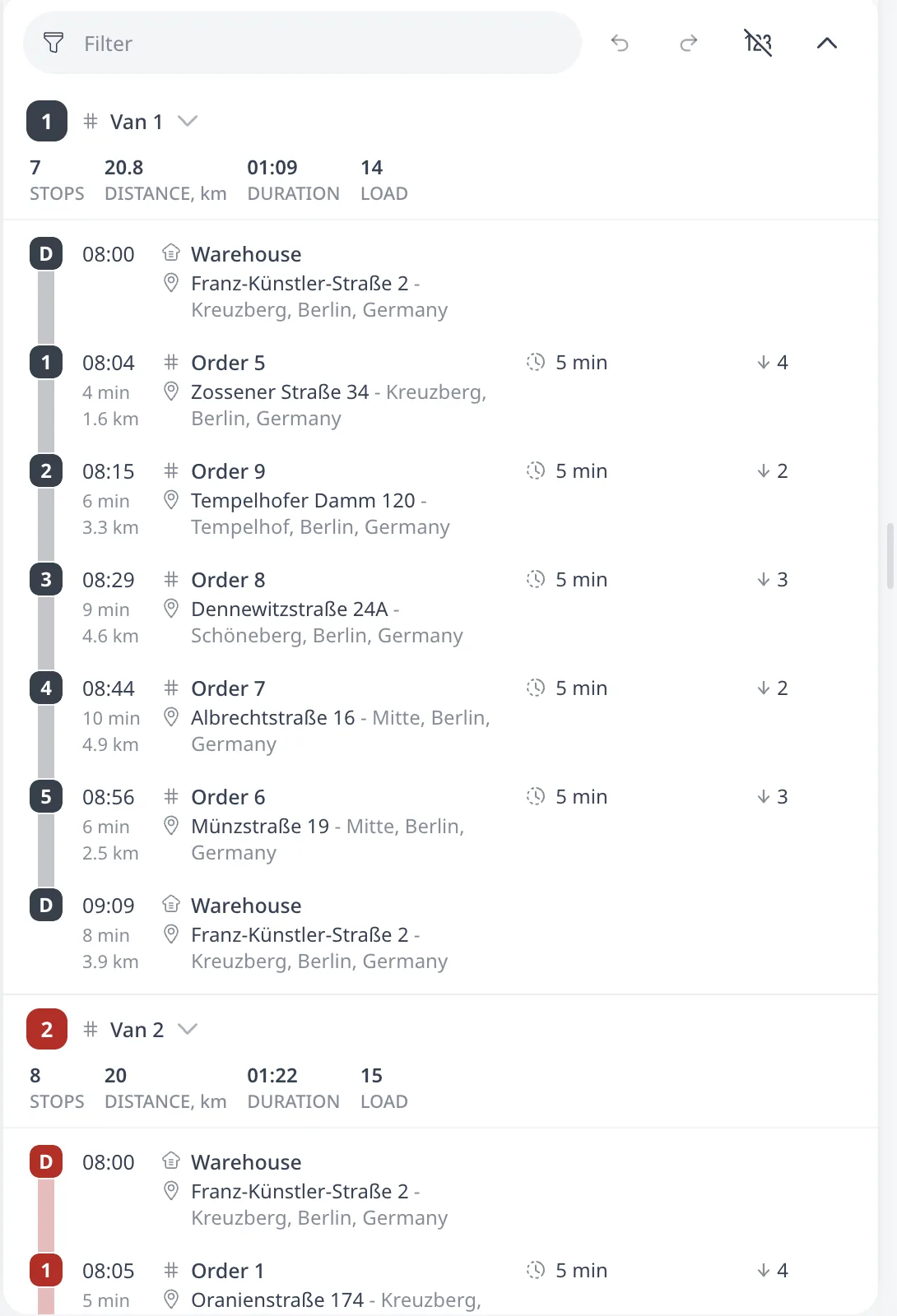
After an optimization the loads appear in three places:
- Each route card shows LOAD, the total load delivered on the route. Collected load is not part of that number, so the 4 units collected at Return 1 are not counted in it.
- Each stop row shows its own load with an arrow, down for a delivery and up for a pickup.
- The Excel export's Routes stats sheet adds Load factor (Peak), % and Load factor (DW), %, two measures of how full each vehicle is.
Load factor (Peak), % is the highest load the vehicle carries at any point on the route, divided by its capacity. Load factor (DW), % weights the load on each leg by the distance of that leg, so a van that is full on one leg and nearly empty on the next ten gets a low value. Low load factors across the fleet indicate the plan can run with fewer vehicles. See Routes stats columns.
Multiple load units
A plan can name up to four load units, for example kg and pallets. The optimizer checks each unit separately. The load on board must fit the vehicle's Capacity in every unit at every stop. An order then has one Delivery and one Pickup value per unit. A vehicle has one Capacity value per unit.
Units are named in Settings, under Load units. The list is ordered,
and the arrows next to each row reorder it. The plain Pickup, Delivery,
and Capacity spreadsheet columns refer to the first unit. Lists show
values in unit order. Unit names are case-insensitive, so kg and KG are one
unit. Saved units apply to the loaded plan and become the default for new
plans. Importing a spreadsheet with unit columns also names units. The
assistant can name them on a plan that has none yet.
A plan without unit names has one unnamed unit. Naming it renames that unit, and every value stays. Deleting a unit removes that unit's values from the plan on Save. Clearing the name of the only unit returns the plan to a plain unnamed unit and keeps the values.
A plan with two or more units uses a larger optimizer. Saving the second unit starts a one-time download. The route editing session restarts on the next optimization with its undo history cleared. A confirmation dialog states both before the unit is saved.
With units named, the order editor shows one Delivery and one Pickup
input per unit, and the Fleet editor shows one Capacity input per unit,
each labeled with its unit name, for example Delivery, kg. An empty
input counts as 0 on that unit. The field is unset only when every one of
its inputs is empty. A vehicle with Capacity, kg 300 and an empty
Capacity, pallets input has a pallet capacity of 0, not unlimited.
In spreadsheets each unit is a column of its own: Delivery, kg,
Pickup, kg, and Capacity, kg. Importing a workbook with unit columns
names the units in header order. The plain Delivery column always means
the first unit. When a workbook has both Delivery and the first unit's own
column, the import reports an error and ignores the plain column. Columns
past the fourth unit are ignored with a warning. See the
Spreadsheet column reference.
After an optimization every load number is shown per unit. The route card's
LOAD shows one value per unit, in unit order, separated by /. Hovering
it shows each value with its unit name. The Excel export adds the same
per-unit columns.
The driver's mobile view labels each
load with its unit name.
If a route shows "Overloaded by N"
A route the optimizer builds is never overloaded. The red problem line appears only after manual edits, when a dragged stop puts more load on the route than the vehicle holds. On a plan with named units the line states the unit, for example "Overloaded by 4 (kg)". Three fixes clear it:
- Move a stop to another route.
- Raise Capacity on the vehicle, if the actual van holds more than the number entered.
- Add a reload by raising Max reloads on the vehicle, so it returns to the depot mid-route and carries a second load.
Next step
Capacity is not the only limit on a route. A van with space left can still have no shift time left. See Shifts, working hours, and route limits.
FAQ
How does vehicle capacity work?
Every vehicle has a Capacity. Every order has a load, set in its Delivery and Pickup fields. Both use one unit of your choice. The optimizer computes the load on board after every stop and checks it against the vehicle's Capacity, so it never builds a route that overloads a vehicle. An empty Capacity means unlimited.
What is the difference between Delivery and Pickup on an order?
Delivery is the load the vehicle carries from the depot to the stop. Pickup is the load it collects at the stop and carries back to the depot. An order can have both. Delivery 2 with Pickup 1 means the vehicle delivers 2 boxes and collects 1 empty box at the same stop.
What happens when the load does not fit?
Capacity is a hard limit. When an order's load does not fit on a route, the optimizer assigns the order to another vehicle. When the whole fleet lacks the capacity, the orders that do not fit go unassigned. A vehicle that reloads at a depot starts the next trip with its full Capacity available.
Can a plan track more than one load unit?
Yes, a plan can name up to four load units, for example kg and pallets, under Load units in Settings. The optimizer checks each unit separately. The load on board must fit the vehicle's Capacity in every unit at every stop.
Why does a route show Overloaded by N?
A route the optimizer builds is never overloaded. The red problem line appears only after manual edits, when a dragged stop puts more load on the route than the vehicle holds. Move a stop to another route, raise Capacity if the actual vehicle holds more, or add a reload by raising Max reloads.