Alternative pickup & delivery locations
By Nathan ColeUpdated
With alternative locations, an order lists several candidate addresses. The optimizer serves at most one of them. A parcel can be delivered to the customer's door or to a nearby locker. Stock can be collected from either of two shops. This page covers alternative groups on plain orders, candidate locations on transfer ends, and how the routing plan reports the choice.
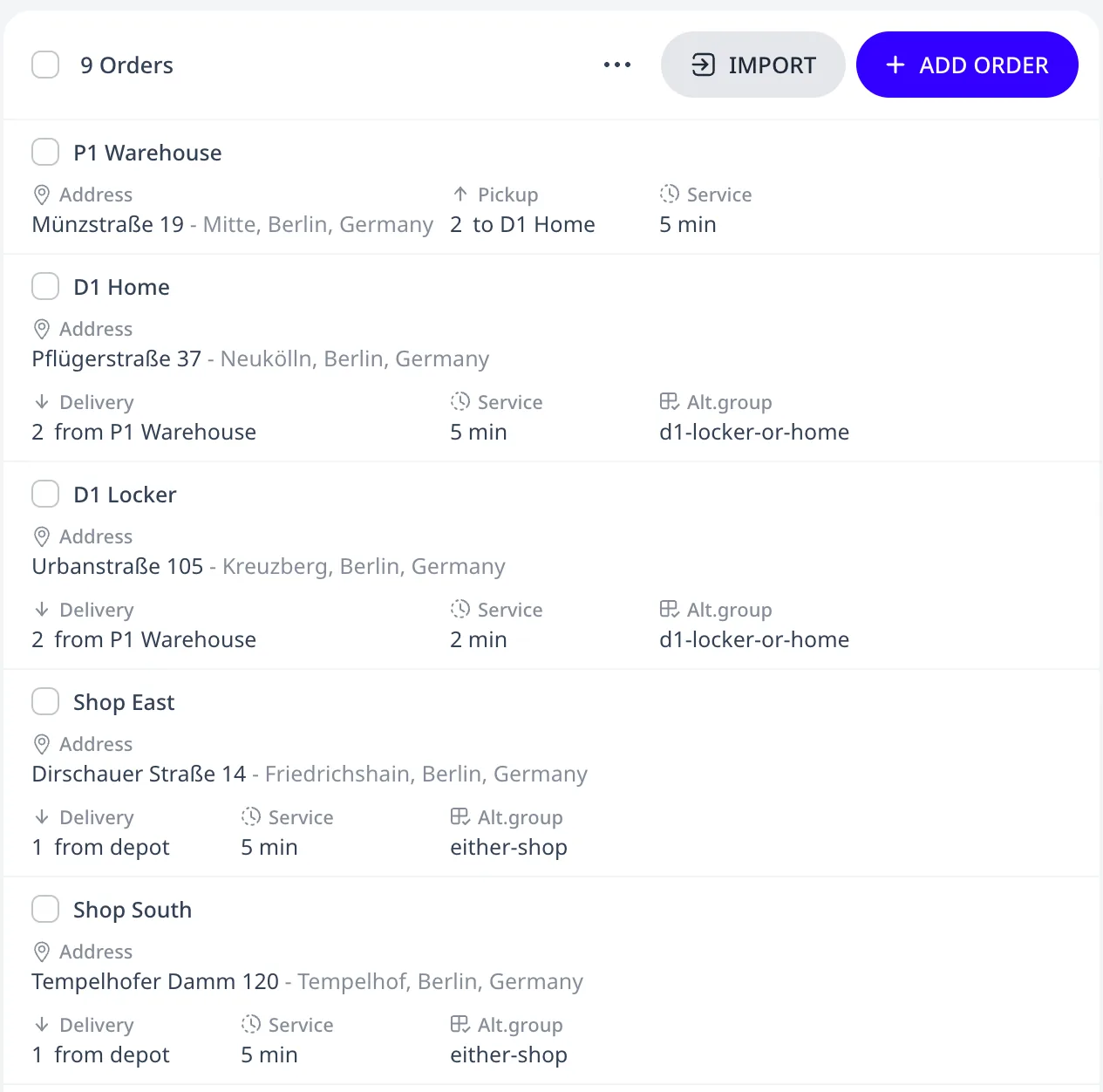
This tutorial plan has a transfer whose delivery can be made at the customer's home or at a locker, an order that can be delivered to either of two shops, and four regular orders. Two couriers serve them:
Alternative groups on plain orders
For plain orders, put every candidate in one Alternative group
(the Group column in spreadsheets). The optimizer serves at most one
member, the one that makes the whole plan cheapest. It reports the
others as not chosen rather than unassigned. Each candidate has its own
address, time window, and service duration. In the tutorial plan the
orders Shop East and Shop South share one Alternative group named
either-shop. Each has a Delivery of 1 at its own address.
Candidate locations on transfer ends
Either end of a pickup & delivery transfer can have several candidate locations, for example the home address or a locker on the delivery end, or either of two shops on the pickup end. To set them up:
- Give every candidate of one end the transfer's Transfer id and that end's role (all pickup or all delivery).
- Put those candidates in one Alternative group of their own. The pickup side and the delivery side each use their own group.
The tutorial plan's transfer T1 has its pickup at P1 Warehouse and two delivery candidates, D1 Home and D1 Locker. Both have the Transfer id T1 and share one Alternative group named d1-locker-or-home. Each has its own address and Service duration. Service takes 5 minutes at D1 Home and 2 minutes at D1 Locker.
The optimizer serves exactly one pickup candidate and exactly one delivery candidate of a transfer. It chooses the combination that makes the whole plan cheapest. A fresh optimization may switch to a different candidate as the plan changes.
A transfer end may have up to 8 candidates. The number of pickup candidates multiplied by the number of delivery candidates may not exceed 16.
Reading the result
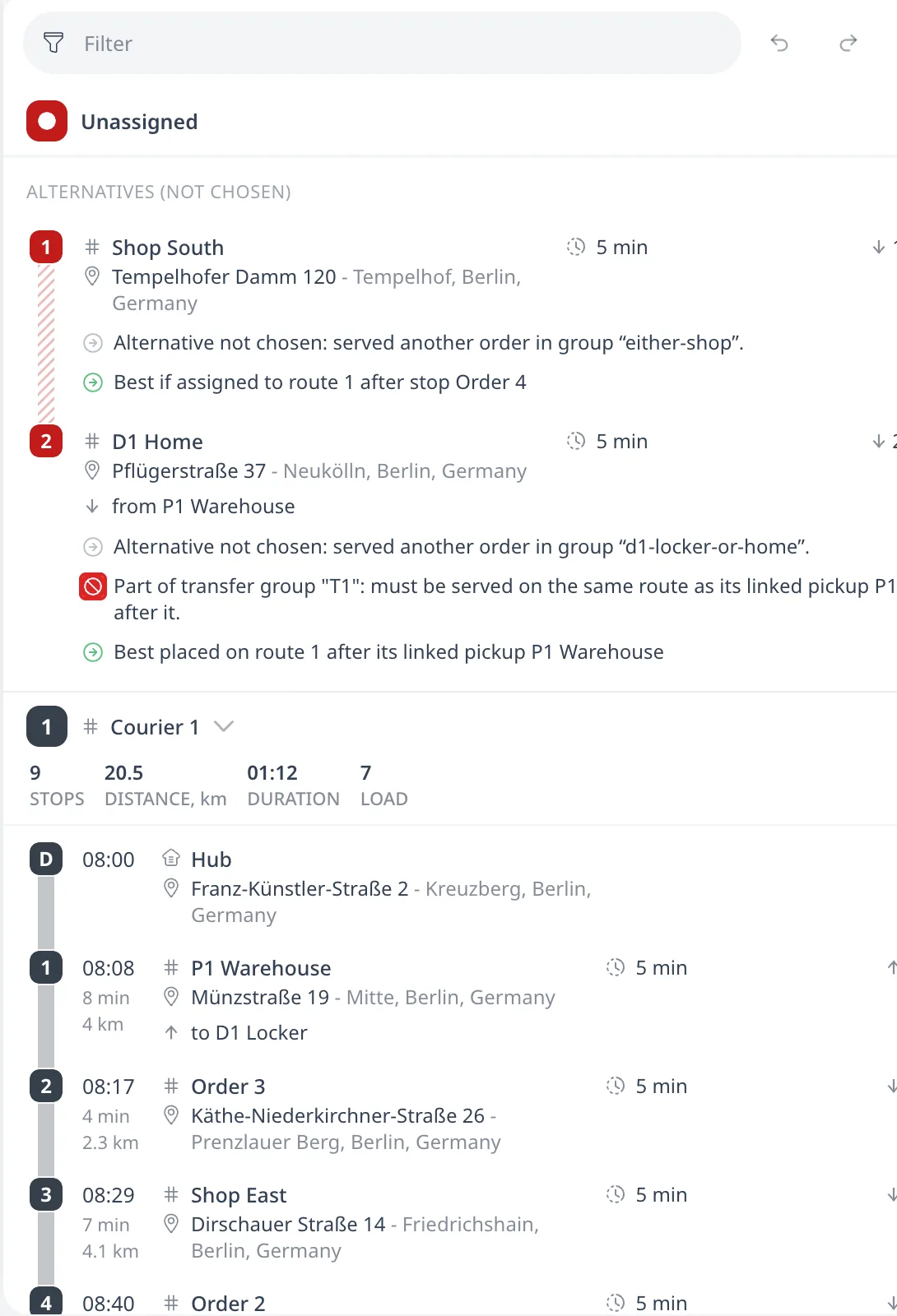
- Routes show the chosen candidate as a normal stop.
- The other candidates appear under Alternatives (not chosen). They do not count as unassigned.
- When no route can serve a transfer, the Unassigned panel lists one row per end, under the first candidate of that end, not one row per candidate. When no route can serve any member of a plain alternative group, every member gets its own unassigned row.
- On the Orders page, selecting a transfer order shows a dashed line between its pickup and delivery candidates.
Consistency requirements
- All candidates of one end must have the same load. The pickup load must equal the delivery load. All orders of one transfer must have the same tags, priority, Load class, Max time in vehicle, and Max ride overtime. In the tutorial plan D1 Home and D1 Locker both have a Delivery of 2, equal to the Pickup of 2 at P1 Warehouse.
- A transfer candidate may have only one time window. A plain alternative may have several.
- A transfer end's group may contain only that end's candidates, with no plain orders mixed in.
Each violation shows as a warning. Saving is never blocked. An import reports each one and still imports the row. The order editor shows the warning under Transfer id when a transfer order has no id yet, or when its load differs from the linked order's load. The optimizer leaves an inconsistent transfer, with every candidate of both ends, off the routes. The rest of the plan still optimizes. See Why an order went unassigned.
Next step
Order sequences: strict visiting order covers orders chained into one run that one vehicle serves in a fixed order.
FAQ
What are alternative locations?
An order can list several candidate addresses. The optimizer serves at most one of them. A parcel can be delivered to the customer's door or to a nearby locker. Stock can be collected from either of two shops. Each candidate has its own address, time window, and service duration.
How do I set up an either-of-these order?
For plain orders, put every candidate in one Alternative group. In spreadsheets this is the Group column. The optimizer serves at most one member, the one that makes the whole plan cheapest, and reports the others as not chosen rather than unassigned. A fresh optimization may switch to a different candidate.
Can a pickup and delivery transfer have alternative ends?
Yes. Either end can have several candidates. Give every candidate of one end the transfer's Transfer id and that end's role. Put them in an Alternative group of their own. The two ends use separate groups. The optimizer serves exactly one pickup and one delivery candidate. A transfer end may have up to 8 candidates.
Are the not chosen candidates a problem?
No. Routes show the chosen candidate as a normal stop, and the other candidates appear under Alternatives, not chosen, where they do not count as unassigned. When no route can serve a transfer, the Unassigned panel lists one row per end, under the first candidate of that end.