Tags: vehicle-order compatibility
By Nathan ColeUpdated
Tags are labels that decide which vehicle may serve which order. A vehicle lists its capabilities in Tags. An order lists the tags it needs in Required tags and may be served only by a vehicle that has all of them. Forbidden tags exclude vehicles that have them. Matching is a hard rule the optimizer never breaks to lower cost.
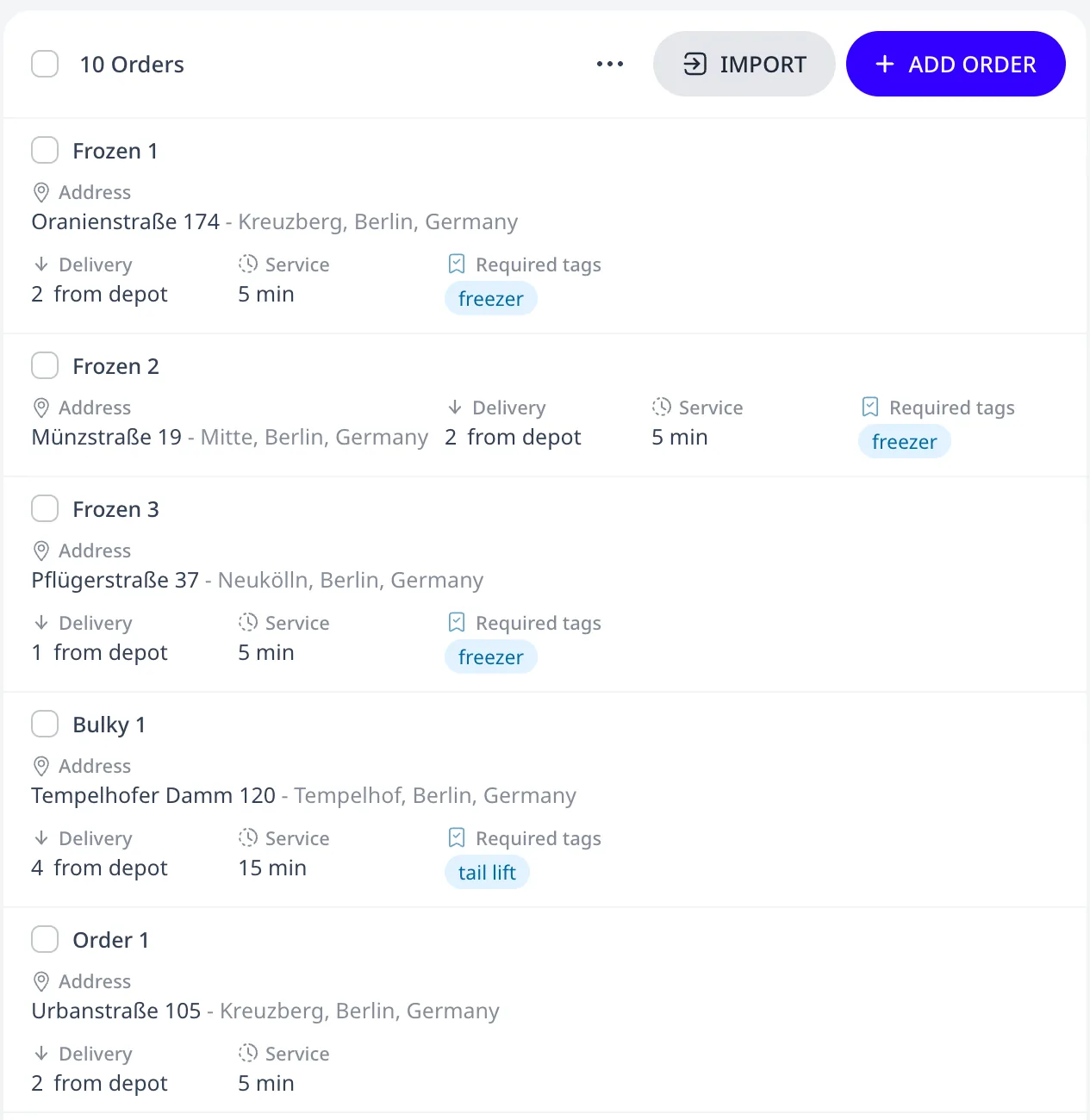
In this tutorial plan three frozen orders require the tag "freezer" and one bulky order requires "tail lift". The Freezer van has "freezer" and the Box truck has "tail lift":
How matching works
- A vehicle lists its capabilities in Tags ("freezer", "tail lift", "driver-with-key").
- An order that needs a capability lists it in Required tags. A vehicle may serve the order only if it has every required tag.
- An order can also list Forbidden tags. A vehicle with any of them may not serve that order. A food order that forbids "hazmat" excludes every vehicle tagged "hazmat".
Tags are plain text you invent. Spelling must match exactly. The order editor warns when no vehicle in the plan has a required tag.
What the optimizer does
Compatibility is a hard constraint. The optimizer never breaks it to lower cost. Six of the plan's ten orders, Order 1 to Order 6, have no tags, so either vehicle may serve them. The other four have one compatible vehicle each, so in every routing plan the Freezer van serves the three frozen orders and the Box truck serves Bulky 1:
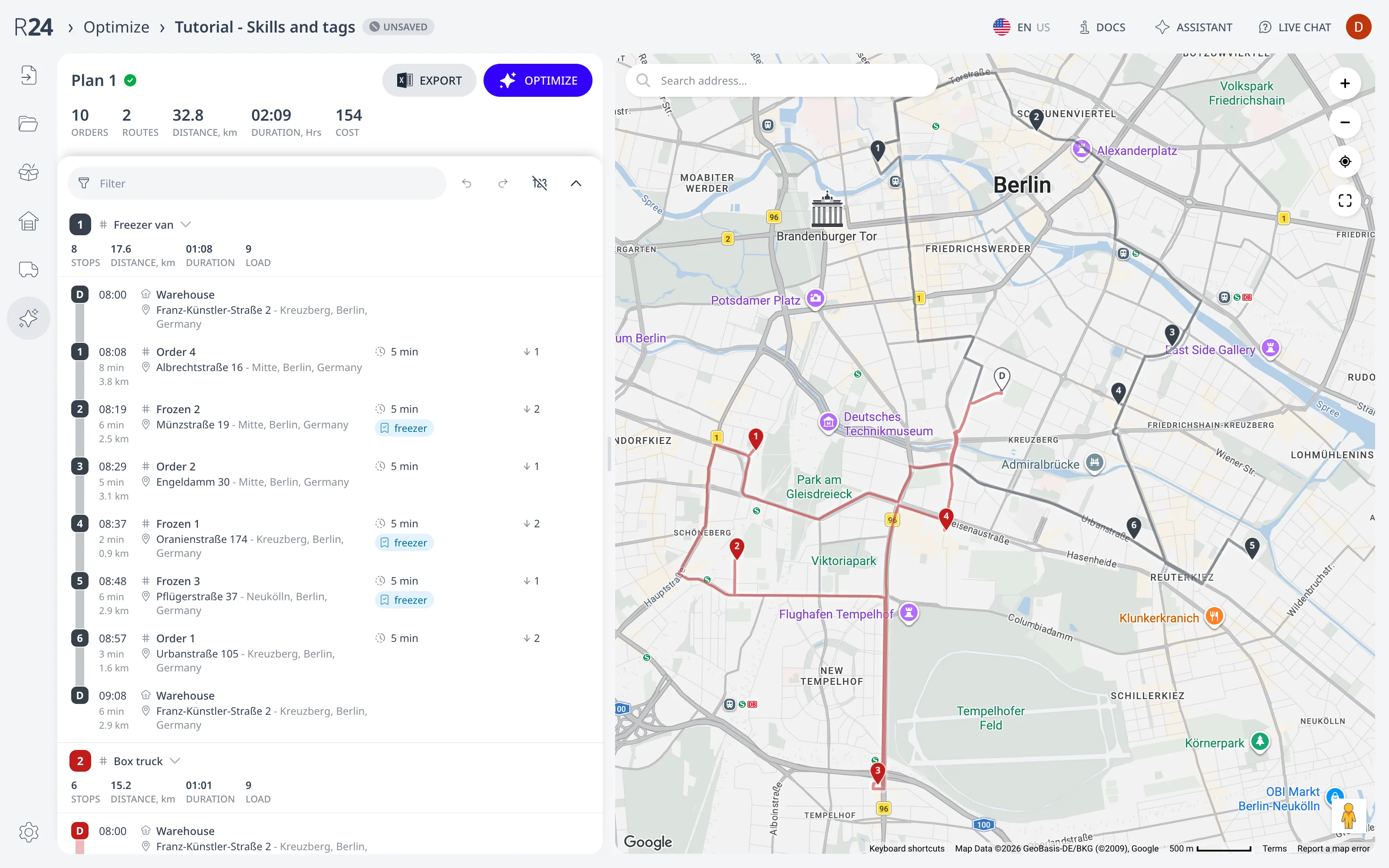
If no compatible vehicle can fit an order, it goes unassigned with a reason that refers to the tag conflict.
Force allow and force deny
When the exception is per order rather than per capability, these two vehicle fields override the tag rules for the orders you list:
- Force allow orders: this vehicle may serve the listed orders regardless of tags.
- Force deny orders: this vehicle may never serve the listed orders, even when its tags match. Force deny orders wins over Force allow orders.
Both lists cover single cases: a customer who refuses one driver or a gate that only one van passes through. When the same kind of order appears in a force list repeatedly, define a tag instead.
In spreadsheets
Orders take the columns Required tags and Forbidden tags. Vehicles take
Tags, Force allow, and Force deny. All five columns take
comma-separated values. The two force columns take order ids. See the
column reference.
Next step
Tags decide which vehicle may serve an order. Product segregation: do not mix load classes decides which orders may share a route. For work that pairs a pickup with its delivery on the same route, see Pickup & delivery transfers.
FAQ
Does a vehicle need every required tag or just one?
A vehicle needs every one. An order with Required tags freezer and tail lift may be served only by a vehicle whose Tags include both. A vehicle with only freezer may not serve it. Forbidden tags exclude a vehicle that has any of them. Spelling must match exactly. The order editor warns when no vehicle has a required tag.
What happens when no vehicle matches an order's tags?
The order goes unassigned, with a reason that refers to the tag conflict. The optimizer never lowers cost by breaking compatibility. Fix it by giving a vehicle the required tag, by dropping the tag from the order, or by listing the order in a vehicle's Force allow orders field, which overrides the tag rules for that order only.
When should I use Force allow or Force deny instead of tags?
Use a force list for a single exception rather than a capability. List a customer who refuses one driver in that vehicle's Force deny orders. List a gate that only one van passes in that van's Force allow orders. Force deny wins over Force allow. When the same kind of order recurs in a force list, define a tag instead.