Order sequences: strict visiting order
By Nathan ColeUpdated
An order sequence chains several orders into one run. One vehicle serves the run. The members have a fixed visiting order, such as collect the parts, survey the site, install the rig, and hand over the keys. Every member has the same Sequence group name and its own Sequence rank. The member with the lower rank is served first. The pickup at one member supplies the deliveries of later-ranked members.
This page covers how to set up a sequence, what the optimizer does with it, the limits on a run, and what Routing24 reports when a manual edit breaks a run.
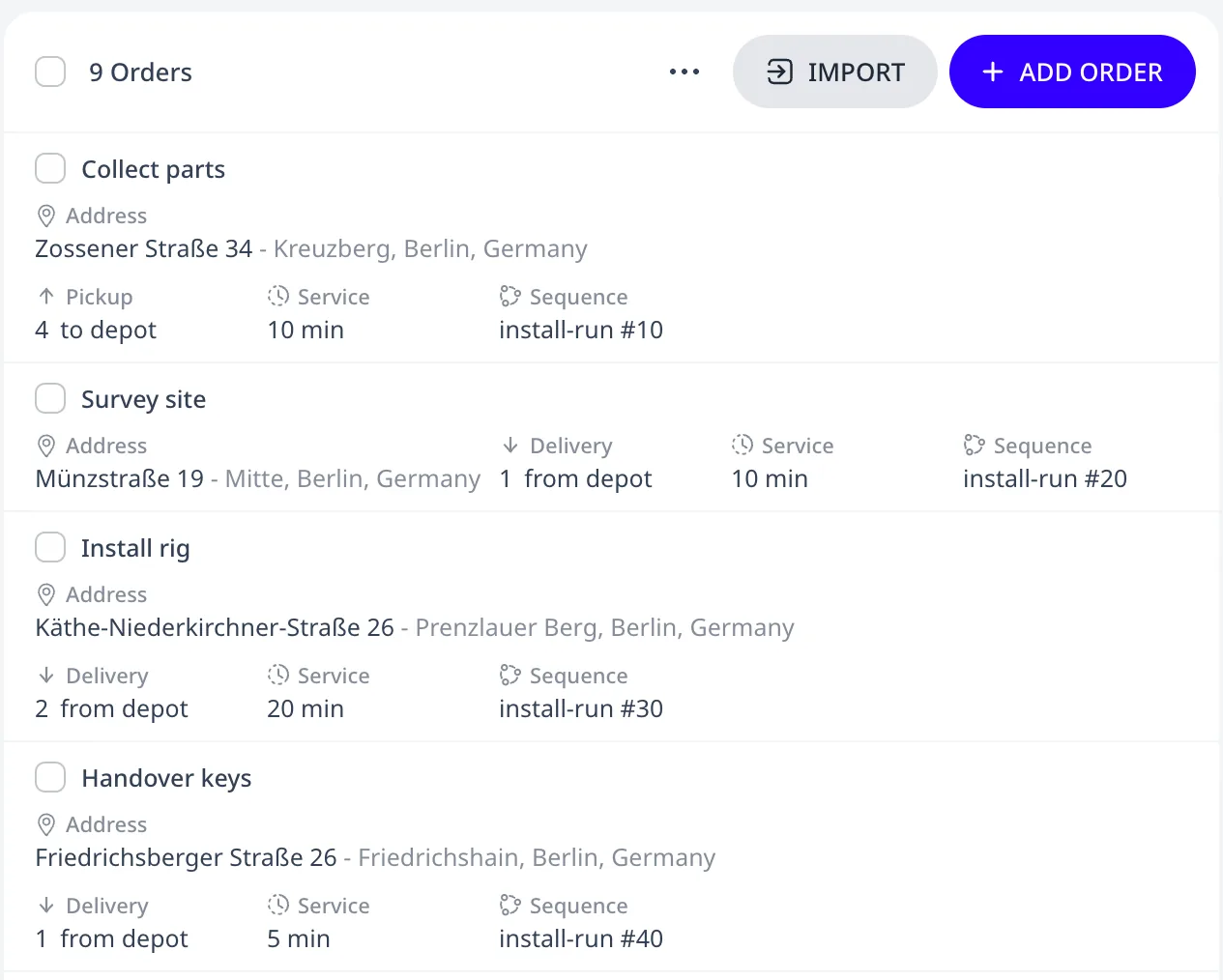
This tutorial plan has a four-order installation run and five unrelated orders:
Setting up a sequence
In the order editor, set Order type to Custom sequence, then give
every order of the run the same Sequence group name and a
Sequence rank (the Sequence group / Sequence rank columns in
spreadsheets). The tutorial plan's four members share one Sequence
group named install-run and have ranks 10, 20, 30, and 40. Each member's
row in the Orders list then shows a Sequence chip with the group name and
the rank.
- The member with the lower rank is served first. Ranks do not need to be consecutive. The ranks 10, 20, 30, and 40 leave room to insert an order between two members later.
- Members with equal ranks may be served in any order.
- The optimizer may place unrelated stops between the members.
Routing24 has two ways to link orders:
- A transfer (PUD) links exactly one pickup to one delivery through a shared Transfer id. The quantities must match. There are no ranks. The only rule is that the pickup is served before the delivery.
- In a sequence, each member has its own ordinary Pickup and Delivery amounts. A pickup increases the load on board. A delivery at a later-ranked member decreases it. One pickup can therefore supply several later deliveries, and several pickups can supply one delivery. The vehicle serves the members in rank order.
Use a transfer for one pickup and one delivery that belong together. Use a sequence when several orders form a run with a fixed visiting order. An order is either a transfer end or a sequence member, never both.
What the optimizer does
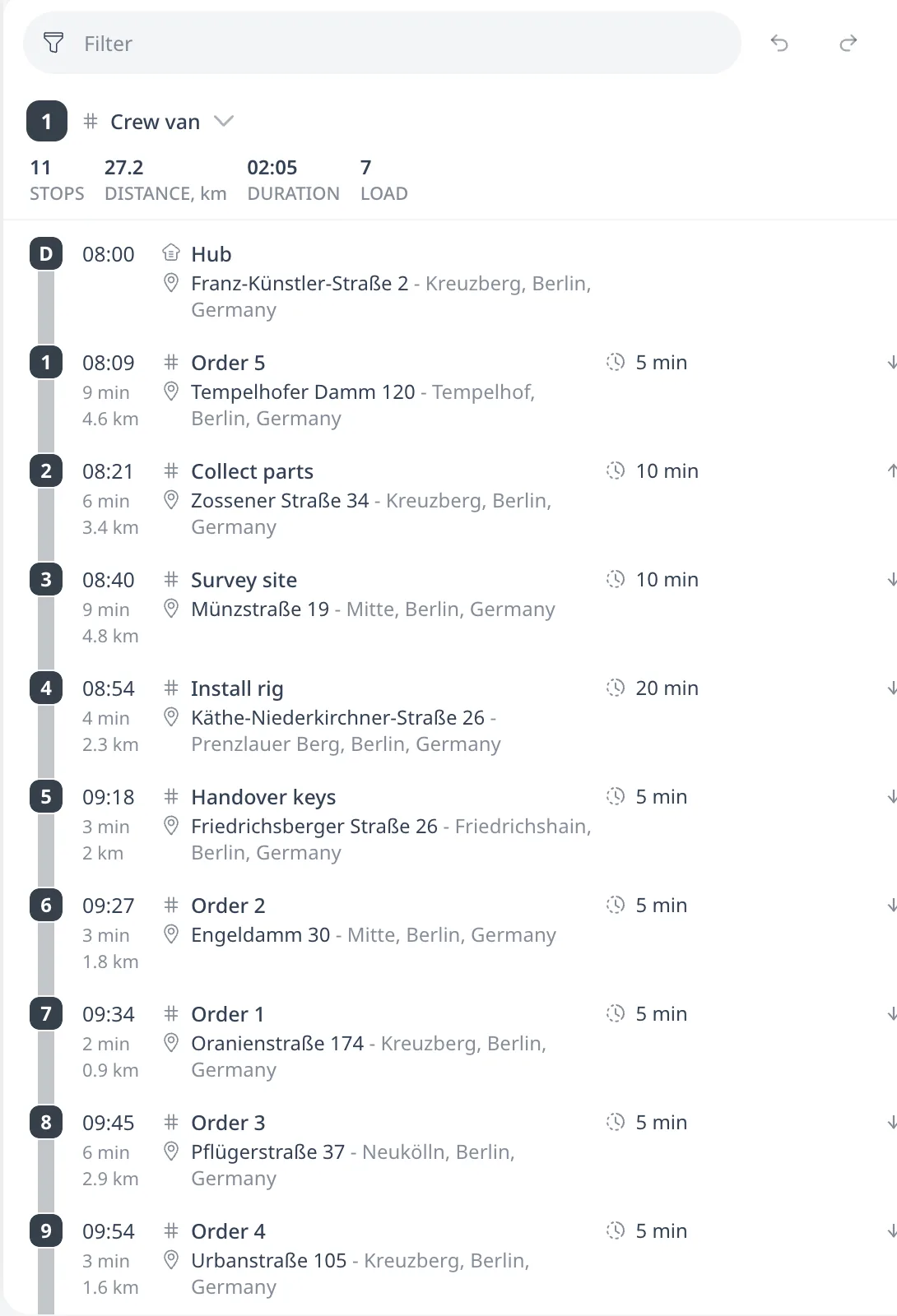
- One vehicle serves the whole sequence. The optimizer never splits a run across routes. In the tutorial plan the Crew van serves all four members and the Courier serves none.
- The vehicle serves the members in rank order across the whole route, reload trips included. The Crew van serves Order 5, then the four members in rank order, then Order 2, Order 1, Order 3, and Order 4.
- The optimizer computes the load on board after every stop and checks it against the vehicle's Capacity. The run picks up 4 units and delivers 1, 2, and 1 at the later members, so it occupies at most 4 units of the Crew van's capacity.
- The optimizer serves the sequence all-or-none. If it cannot place one member, every member of the group goes unassigned. The Unassigned panel above the route cards states the reason once, on the member that blocks the run. The same happens when the load on board during the run exceeds every vehicle's Capacity at some point. Two pickups of 3 before one delivery of 6 do not fit a van with a Capacity of 5, even though each order alone would.
Limits and behavior
- A sequence contains 2 to 16 orders.
- A member is an order of type Custom sequence with one time window. The same order cannot also be a transfer end or have alternative locations. Each member has its own address, time window, priority, and Pickup and Delivery amounts, which work as on any other order.
- The pickup at one member supplies the deliveries of later-ranked members. In the tutorial plan the vehicle picks up 4 units at Collect parts (rank 10). It delivers 1 at Survey site (rank 20), 2 at Install rig (rank 30), and 1 at Handover keys (rank 40). The vehicle loads nothing at the depot for the run. The LOAD of 7 on the Crew van's route card is the depot load of its five unrelated orders. The vehicle loads at the depot only what the run's own pickups do not supply. If Install rig needed 3 units, the vehicle would load the missing unit at the depot. If Handover keys needed nothing, the vehicle would carry the spare unit back to the depot.
- A pickup supplies only members ranked after it. If Survey site had a lower rank than Collect parts, the vehicle would load its 1 unit at the depot. Members with equal ranks never supply each other, because either of them could be served first.
- A run may span reload trips. At the depot the vehicle unloads its pickups, loads the deliveries of the next trip, and keeps the run's goods on board. Those goods occupy capacity in the later trips until the vehicle delivers them.
- A sequence member in a vehicle's Force allow orders or Force deny orders list is ignored at optimization. Use tags to restrict the whole run to suitable vehicles.
A sequence is invalid when it has fewer than 2 or more than 16 members, when a member is a transfer end, when a member is in an alternative group, or when a member has more than one time window. An import reports each violation as a warning and still imports the row. The optimizer leaves every member of an invalid sequence off the routes. The rest of the plan still optimizes.
Manual editing
When you edit routes manually, Routing24 never rejects a sequence edit. Moving a member out of rank order, moving it to another vehicle, or parking part of the run marks every affected stop with the problem "Sequence group broken (its orders run on one route, in their given order)". Those stops count toward the # PROBLEMS metric until every member is back on one route in rank order.
Next step
A sequence sets the visiting order of its members on one vehicle's route. Run the optimizer covers what an optimization needs, the time budget, and what a re-run replaces.
FAQ
What is the difference between an order sequence and a transfer?
A transfer links one pickup to one delivery by a Transfer id. Both quantities are equal. It has no ranks. A sequence chains 2 to 16 orders served in rank order. Each member has its own Pickup and Delivery amounts, so one pickup can supply several later deliveries. An order is a transfer end or a sequence member, never both.
Can other stops be served between the members of a sequence?
Yes. The ranks set which member is served before which. They do not set where the members are on the route. The optimizer may place unrelated orders between them. In the tutorial plan the Crew van serves Order 5, then the four members in rank order, then four unrelated orders. Members with equal ranks may be served in any order.
What happens when one member of the run cannot be placed?
If one member cannot be placed, the whole group goes unassigned. The Unassigned panel states the reason once, on the member that blocks the run. The same happens when the load on board during the run exceeds every vehicle's Capacity. Two pickups of 3 before one delivery of 6 do not fit a van with a Capacity of 5.
Does the vehicle load anything at the depot for the run?
Only what the pickups do not supply. In the tutorial the vehicle picks up 4 units at rank 10 and delivers 1, 2, and 1 at ranks 20, 30, and 40, so it loads nothing at the depot. Had the rank-30 delivery needed 3 units, the depot would supply the missing unit. A pickup supplies only members ranked after it.