Pickup & delivery transfers
By Nathan ColeUpdated
A transfer links two orders into one pickup-and-delivery pair. One vehicle serves both orders, pickup first. The vehicle collects the consignment at one customer address and delivers it at another. The consignment does not pass through a depot. It occupies capacity between the two stops. Transfers are for point-to-point courier work, such as flowers collected at a florist and delivered across town.
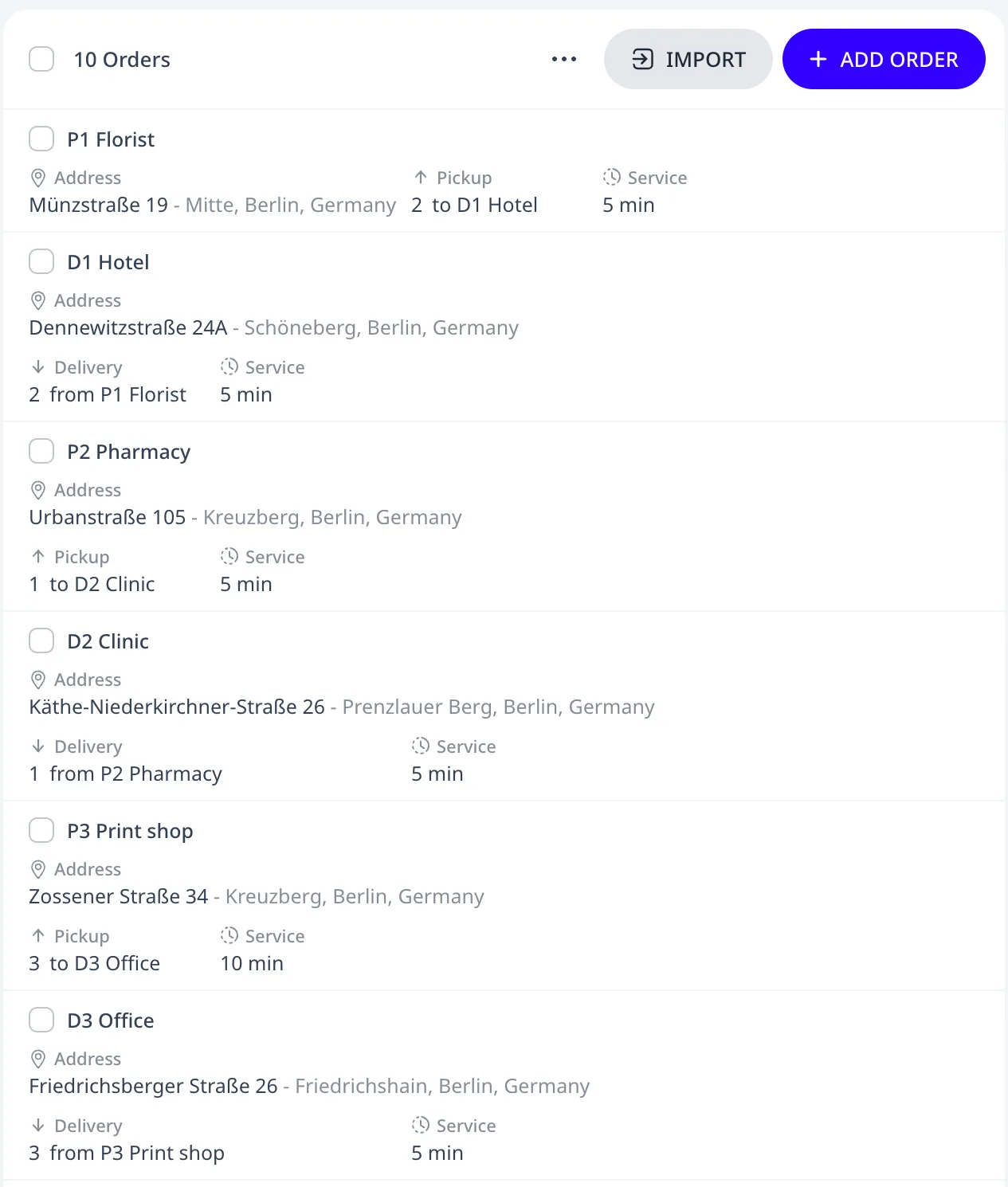
This tutorial plan has three transfers and four depot orders:
Transfer or depot order
For a depot order, the goods start or end at a depot. For a transfer, they do neither. The table lists the differences:
| Depot order | Transfer | |
|---|---|---|
| Goods move | Between the depot and the stop | Between two customer addresses, no depot in between |
| Modeled as | One order with a Delivery or Pickup load, or both | Two orders sharing a Transfer id, Pickup on one order and Delivery on the other |
| Vehicle | Any compatible vehicle | One vehicle serves both orders |
| Position on the route | Any | Pickup before delivery |
| Load on board | From the depot to the stop, or from the stop back to the depot | From the pickup stop to the delivery stop |
| Max time in vehicle | Counts from the trip's depot departure | Counts from the pickup, with an optional Max ride overtime |
How a pair is modeled
A transfer is two orders that share a Transfer id, each with Order type set to Transfer order (PUD):
- The pickup order has the consignment quantity in its Pickup field. Entering that quantity makes the order the pickup of the pair. The editor then disables Delivery on it.
- The delivery order has the same quantity in its Delivery field and the same Transfer id.
Each order keeps its own address, time window, and service duration. "Pick up after 10:00, deliver before 14:00" is therefore two time windows, one on each order. Both orders of a transfer must have the same priority, tags, and Load class. When the values differ, the optimizer skips the whole transfer, the same as for differing Max time in vehicle values below.
In the order editor, setting Order type to Transfer order (PUD)
shows the Transfer id field. The field suggests the transfer ids
that other transfer orders in the plan already use, paired or not.
Entering the id of an unpaired pickup makes this order its delivery, and
the other way round. The editor shows a warning until an id is entered.
It shows another warning when the two loads differ. Neither warning
blocks saving. In spreadsheets, the Order type and Transfer id
columns set the same fields. See the
column reference.
Either order can have several candidate addresses, for example a home address or a locker. See alternative locations.
What the optimizer guarantees
For every pair:
- One vehicle serves both orders. The load never passes from one vehicle to another.
- The pickup comes before the delivery.
- The consignment occupies capacity between the two stops, alongside any depot loads the vehicle carries.
- A pair may span a reload. The delivery may then be in a later trip than the pickup. At the depot the vehicle unloads collected pickups and loads the next trip's deliveries. The consignment stays on board and occupies capacity until the vehicle delivers it.
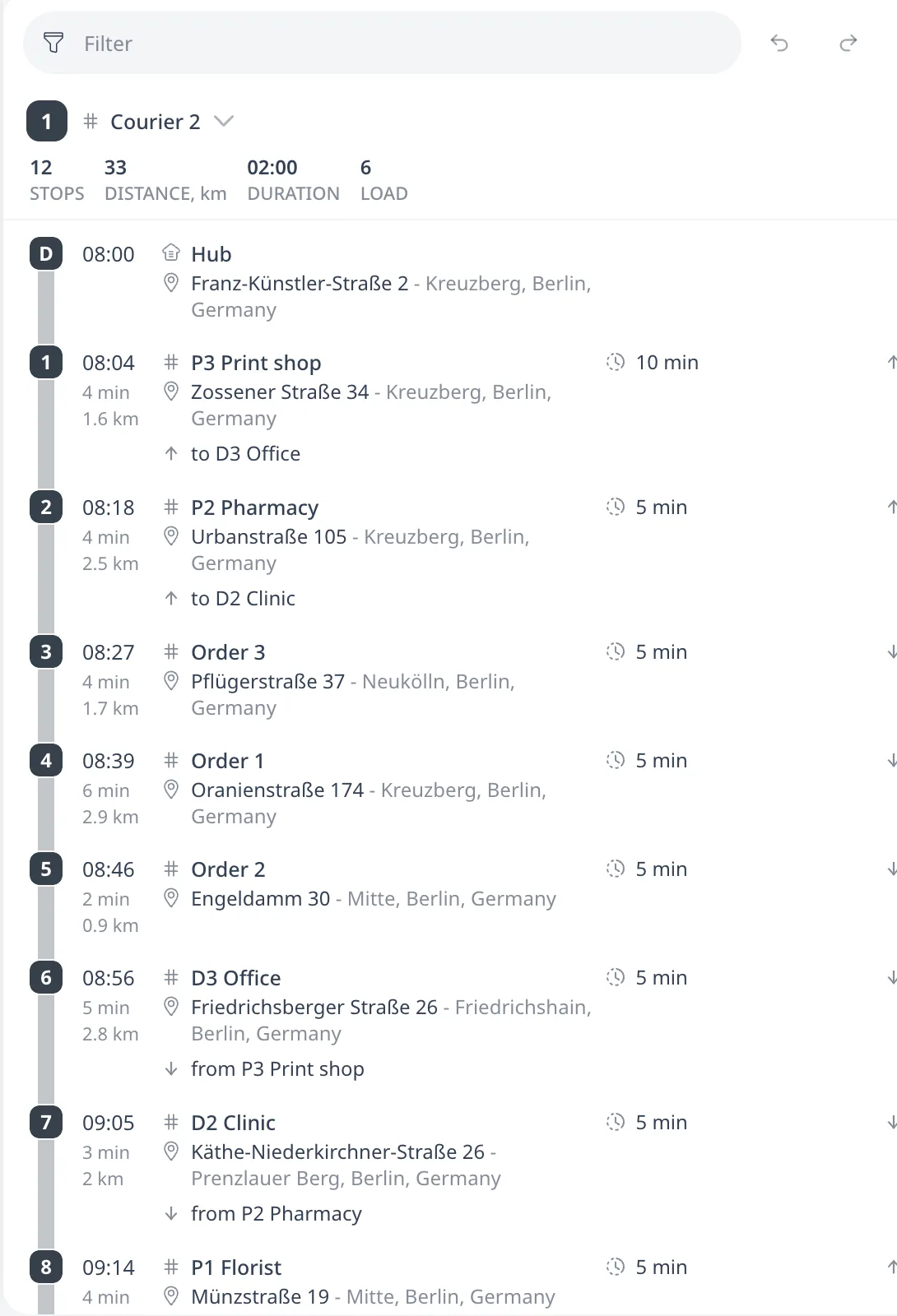
The route card shows the link under each transfer stop, with the id of the partner order.
Limiting the ride time
Max time in vehicle, in minutes, limits how long the consignment stays on board. The limit applies to the ride from the end of service at the pickup to the start of service at the delivery. The optimizer delays the pickup service where that shortens the ride. The consignment then waits at the pickup address instead of on board. Only waiting the optimizer cannot avoid this way counts toward the limit. The ride time keeps counting through a reload between the two stops. Flowers collected at 09:00 under a 45-minute limit are delivered by 09:45, whatever stops are served in between.
In this tutorial plan a gelato transfer has a 30-minute limit. The receiving hotel accepts delivery from 10:00. The optimizer therefore leaves the gelato at the pickup and collects it late, so the ride stays within 30 minutes:
Max time in vehicle must be the same on both orders of the transfer, and on every candidate address when an order has alternative locations. The limit may not depend on which candidate the optimizer serves. Import reports differing values as non-blocking warnings and keeps the rows. The optimizer then skips the whole transfer. The rest of the plan still optimizes.
Max ride overtime, also in minutes, allows ride time past that limit. The optimizer charges the extra time at the vehicle's Ride overtime cost per hour. The gelato transfer above allows 15 minutes. Past the allowance, the limit is hard. The field requires Max time in vehicle on the same transfer. See Vehicle costs and the COST metric.
The order editor shows both fields below Release time. The same Max time in vehicle field appears on depot orders and on transfer orders. Its tooltip explains the meaning that applies to the open order. Max ride overtime appears only on a transfer order. The field on a depot order is described in Max time in vehicle (shelf life).
A break placed between a pickup and its delivery counts toward the transfer's ride time, like driving or waiting. The optimizer avoids that placement where it can. See Driver breaks and driving-time limits.
When a pair cannot be placed
If either order does not fit, both go unassigned, with a reason that refers to both stops. The green suggestion line proposes one placement for the whole pair. It states the route, the stop the pickup follows, and the stop the delivery follows. The delivery may be in a later trip than the pickup, because the consignment stays on board through the reload in between.
The same rule applies to every edit manually. A drag that splits a pair across vehicles, or puts the delivery before its pickup, is not refused. The optimizer applies it and flags it like any other rule-breaking move. Dragging one order off its route while the partner stays on it leaves that order unassigned. A red line then refers to the transfer group and the partner, for example "must be served on the same route as its linked delivery D2 Clinic, before it". The green suggestion line proposes a position on the partner's route, before that linked delivery.
Mixing with depot work
Transfers and depot orders can share one route. A courier may leave the depot loaded with deliveries, serve transfers between those delivery stops, and carry collected pickups back to the depot. The optimizer keeps every pair on one vehicle, pickup first, and minimizes cost.
Next step
When both orders of every transfer are paired, the plan is ready to optimize. Continue with Run the optimizer.
FAQ
What is the difference between a transfer and a depot order?
For a depot order the vehicle carries the Delivery load from the depot to the stop and the Pickup load back to the depot. For a transfer the vehicle collects the consignment at one customer address and delivers it at another. A transfer is two orders sharing a Transfer id. One has the quantity in Pickup, the other in Delivery.
Can the pickup and the delivery be on different vehicles?
No. One vehicle serves both orders of a transfer. The pickup always comes before the delivery. If either order does not fit, both go unassigned with a reason that refers to both stops. A manual drag that splits the pair is not refused. The optimizer applies it and shows a red problem line.
How do I limit how long the goods stay in the vehicle?
Set Max time in vehicle, in minutes, on both orders. It limits the ride from the pickup's end of service to the delivery's start of service. Flowers collected at 09:00 under a 45-minute limit are delivered by 09:45. The optimizer delays the pickup where that shortens the ride. Max ride overtime allows extra ride time at a cost.
Can a transfer share a route with depot deliveries?
Yes. A courier may leave the depot loaded with deliveries, serve transfers between those delivery stops, and carry collected pickups back to the depot. The consignment counts toward capacity alongside the depot loads. A pair may span a reload. At the depot visit the vehicle exchanges its depot loads while the consignment stays on board.